
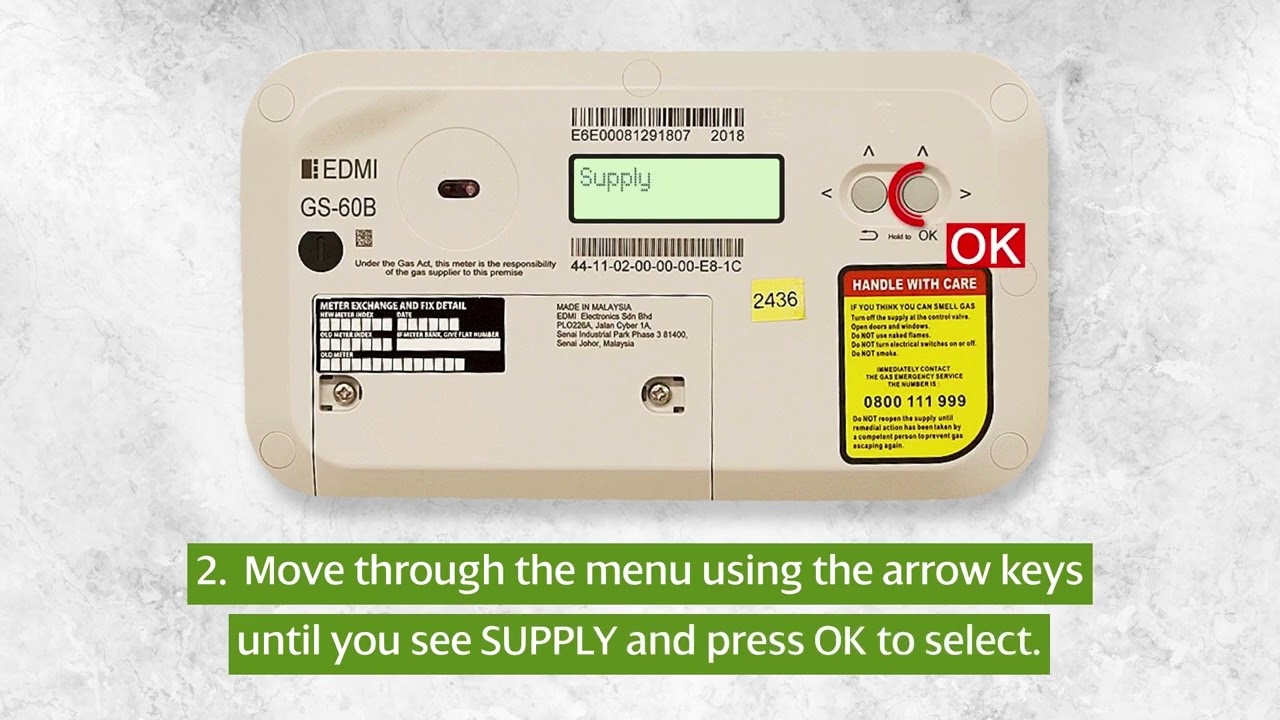
Smart Meter Gas Supply: A Seamless Guide to Enabling Your Gas Service
Experiencing a gas supply interruption or setting up a new service can be a cause for concern, but with modern smart meters, the process of enabling your gas supply is more streamlined than ever. Gone are the days of lengthy waiting periods and inconvenient engineer visits for simple reconnection. Smart meters have revolutionized utility management, offering remote capabilities that put control back into your hands. This article will guide you through the straightforward steps to enable your gas supply using your smart meter, ensuring you get connected quickly and efficiently.
Understanding Your Smart Meter and Gas Supply
Smart meters are advanced digital devices that measure your energy consumption and communicate this data directly to your energy provider. For gas smart meters, this technology extends to managing the flow of gas to your home. Typically, if your gas supply has been shut off, it’s for reasons such as a safety precaution after a prolonged period of no usage, or due to an unpaid bill. In most cases, a smart meter allows for remote re-enablement by your energy provider, significantly reducing the need for a physical visit.
How Smart Meters Facilitate Gas Supply Enablement
The primary advantage of a smart meter in this context is its ability to be remotely controlled. When a gas supply needs to be enabled, your energy provider can send a signal to your meter to restore the flow, provided the necessary safety checks have been made. This remote capability is a significant leap forward, offering:
- Reduced waiting times for reconnection.
- Minimized disruption to your daily routine.
- Enhanced safety through remote monitoring.
Fact: Smart meters can often detect a loss of gas supply and can automatically shut off the gas as a safety measure.
Step-by-Step Guide to Enabling Your Gas Supply
The process to get your gas supply enabled via a smart meter generally involves a few key steps, primarily initiated by contacting your energy provider. Here’s what you can expect:
Contacting Your Energy Provider
The first and most crucial step is to contact your energy supplier directly. You’ll need to inform them that your gas supply is off and you require it to be enabled. Be prepared to provide them with your account details and potentially your smart meter’s unique identification number, which can usually be found on the meter itself.
Information You’ll Need
To expedite the process, gather the following information before you call:
| Information Required | Where to Find It |
|---|---|
| Account Number | Your latest energy bill or online account portal |
| MPRN (Meter Point Reference Number) | Your energy bill or sometimes visible on the meter’s display |
| Smart Meter ID | A unique serial number usually found on the meter unit |
Your energy provider will then assess your situation. If the disconnection was due to a routine safety measure or a planned interruption, and your account is in good standing, they can typically proceed with the remote re-enablement.
The Remote Re-enablement Process
Once your provider confirms that your gas supply can be restored remotely, they will send a signal to your smart meter. This process usually takes anywhere from a few minutes to a couple of hours, depending on the provider’s systems and network load. You may be asked to remain at home during this period, though an engineer visit is generally not required for a remote re-enablement.
Did you know? Smart meters enable two-way communication between your home and your energy provider, allowing for more responsive service and accurate billing.
What If Remote Re-enablement Isn’t Possible?
In some specific circumstances, remote re-enablement might not be an option. This could be due to:
- Safety concerns detected by the meter that require a physical inspection.
- Issues with the smart meter’s communication network.
- The disconnection being a result of a more complex issue requiring an engineer.
If this is the case, your energy provider will schedule an appointment for a qualified engineer to visit your property to safely restore the gas supply. They will inform you of the earliest available appointment and any potential charges that may apply.
Troubleshooting Common Issues
While the smart meter process is designed to be simple, occasional issues can arise. If your gas supply is not enabled after the expected timeframe, here are a few things to check:
Checking Your Smart Meter Display
Your smart meter’s display might show status messages or error codes. Consult your meter’s manual or your energy provider’s website for a guide to these codes. Ensure your meter is switched on and has power, as some smart meters have a backup battery.
Important Safety Note: If you smell gas at any point, do not operate any electrical switches and immediately leave the property. Call your gas emergency service from a safe location.
Verifying Communication
Smart meters rely on a network connection to communicate with your provider. If this connection is lost, the remote signal may not be received. Your energy provider can usually check the communication status of your meter remotely.
Frequently Asked Questions (FAQ)
Q1: How long does it usually take to enable gas supply with a smart meter?
Once confirmed by your energy provider, remote re-enablement typically takes between 30 minutes to a few hours. However, if an engineer visit is required, it will depend on the availability of appointments.
Q2: Do I need to be home for the gas supply to be enabled?
For a remote re-enablement, you generally do not need to be present. However, it’s advisable to be available in case of any immediate issues or to confirm the supply has been restored. If an engineer visit is scheduled, you will, of course, need to be home.
Q3: Will I be charged for enabling my gas supply via a smart meter?
If the disconnection was due to reasons within your control (e.g., non-payment) and requires a remote re-enablement, some suppliers might charge a small fee. However, if the disconnection was for safety reasons and your account is in good standing, they usually won’t charge. Always check with your energy provider for their specific policy.
Conclusion
Enabling your gas supply with a smart meter is designed to be a convenient and efficient process, leveraging advanced technology to minimize disruption. By understanding the steps involved and being prepared with the necessary information, you can ensure a quick and seamless reconnection. Always remember to contact your energy provider as the first point of action, as they possess the tools and authority to manage your smart meter remotely. In cases where remote service isn’t possible, they will guide you through the next steps, including scheduling an engineer if required. Prioritizing safety and clear communication with your provider will guarantee that your gas service is restored promptly, allowing you to return to the comfort of your home with peace of mind.
